
Nginx stub_status 适合采集基础运行状态,例如当前连接数、读写等待状态和累计请求数。它暴露的指标不复杂,但部署成本低,适合作为 Nginx 基础可用性监控的第一步。
本文以 CentOS 7.2 为测试环境,说明如何从编译模块、配置状态页到使用 Categraf 采集指标。由于 Nginx 开启模块或添加模块通常都需要重新编译,生产环境操作前建议先在测试环境验证编译参数和配置文件。
核心要点
http_stub_status_module需要在 Nginx 编译阶段启用,验证方式是检查nginx -V输出中是否包含--with-http_stub_status_module。- 状态页通过
location /stub_status { stub_status on; }暴露,Categraf 的input.nginx插件直接访问该 URL 即可采集。 stub_status指标覆盖基础连接和请求状态,适合轻量监控;如果需要更丰富的 upstream 或 vhost 指标,可以考虑 upstream check 或 vts 方案。- 示例 IP、路径和依赖来自本文测试环境,落地时需要替换为自己的 Nginx 地址、端口和配置目录。
测试环境
- 操作系统: CentOS 7.2
安装依赖
这些依赖是我这个环境下的, 你可以根据自己的环境安装对应的依赖。
yum install -y patch
yum install -y gd gd-devel
yum install -y libxslt-devel
yum install perl-ExtUtils-Embed
编译nginx
感谢@Jeff的细心整理。
./configure \
--with-ld-opt="-Wl,-rpath,/usr/local/lib" \
--prefix=/usr/share/nginx \
--sbin-path=/usr/sbin/nginx \
--modules-path=/usr/lib64/nginx/modules \
--conf-path=/etc/nginx/nginx.conf \
--error-log-path=/var/log/nginx/error.log \
--http-log-path=/var/log/nginx/access.log \
--http-client-body-temp-path=/var/lib/nginx/tmp/client_body \
--http-proxy-temp-path=/var/lib/nginx/tmp/proxy \
--http-fastcgi-temp-path=/var/lib/nginx/tmp/fastcgi \
--http-uwsgi-temp-path=/var/lib/nginx/tmp/uwsgi \
--http-scgi-temp-path=/var/lib/nginx/tmp/scgi \
--pid-path=/var/run/nginx.pid \
--lock-path=/run/lock/subsys/nginx \
--user=nginx \
--group=nginx \
--with-compat \
--with-threads \
--with-http_addition_module \
--with-http_auth_request_module \
--with-http_dav_module \
--with-http_flv_module \
--with-http_gunzip_module \
--with-http_gzip_static_module \
--with-http_mp4_module \
--with-http_random_index_module \
--with-http_realip_module \
--with-http_secure_link_module \
--with-http_slice_module \
--with-http_ssl_module \
--with-http_stub_status_module \
--with-http_sub_module \
--with-http_v2_module \
--with-mail \
--with-mail_ssl_module \
--with-stream \
--with-stream_realip_module \
--with-stream_ssl_module \
--with-stream_ssl_preread_module \
--with-select_module \
--with-poll_module \
--with-file-aio \
--with-http_xslt_module=dynamic \
--with-http_image_filter_module=dynamic \
--with-http_perl_module=dynamic \
--with-stream=dynamic \
--with-mail=dynamic \
--with-http_xslt_module=dynamic
验证
至此 编译完成,输入nginx -V查看编译参数,如果有以下参数则表示编译成功。
--with-http_stub_status_module
stub status配置
进入 /etc/nginx,编辑 nginx.conf 输入以下内容。这里保留一个最小化示例:主配置只负责加载 conf.d/*.conf,具体状态页放在独立站点配置中。
user  nginx;
worker_processes  1;

events {
    worker_connections  1024;
}

http {
    include       mime.types;
    default_type  application/octet-stream;

    sendfile        on;

    keepalive_timeout  65;
    include conf.d/*.conf;
}
创建 conf.d 目录,编辑一个 test.conf 输入以下内容。/stub_status 是后续 Categraf 访问的状态页入口,/test 用于示例 upstream 代理配置。
upstream test {
    server 127.0.0.1:18788 weight=10 max_fails=2 fail_timeout=5s;
}

server {
        listen 80;
        server_name 192.168.11.201;

		location /stub_status {
			stub_status on;
		}

		location / {
                        add_header Content-Type text/plain;
                        return 200 "User-agent: *\nDisallow: /\n";
		}

		location /test {
            proxy_pass_header Authorization;
            proxy_pass_header Accept;
            proxy_set_header X-Real-IP $remote_addr;
            proxy_set_header X-Forwarded-For $proxy_add_x_forwarded_for;
            proxy_set_header X-Forwarded-Proto $scheme;
            proxy_set_header X-Scheme $scheme;
            proxy_set_header Authorization $http_authorization;
            proxy_set_header Accept $http_accept;
            proxy_pass http://test;
		}
}
启动nginx
  nginx -t # 检查配置文件
  nginx #启动nginx
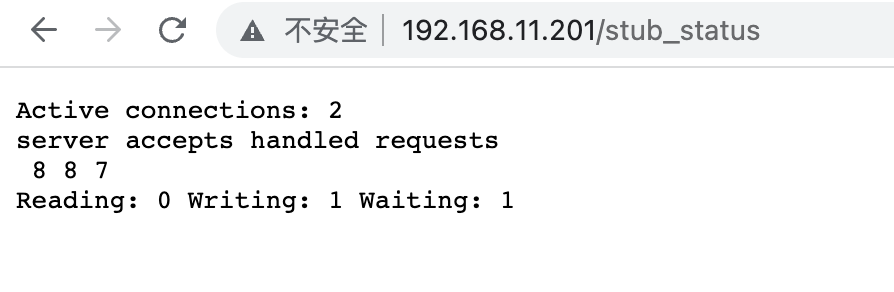
访问 http://192.168.11.201/stub_status 查看状态
categraf input.nginx插件
配置 conf/input.nginx/nginx.toml 内容如下
[[instances]]
urls = [
    "http://192.168.11.201/stub_status",
]
response_timeout = "5s"
启动 Categraf 测试,可以看到已经采集到指标。
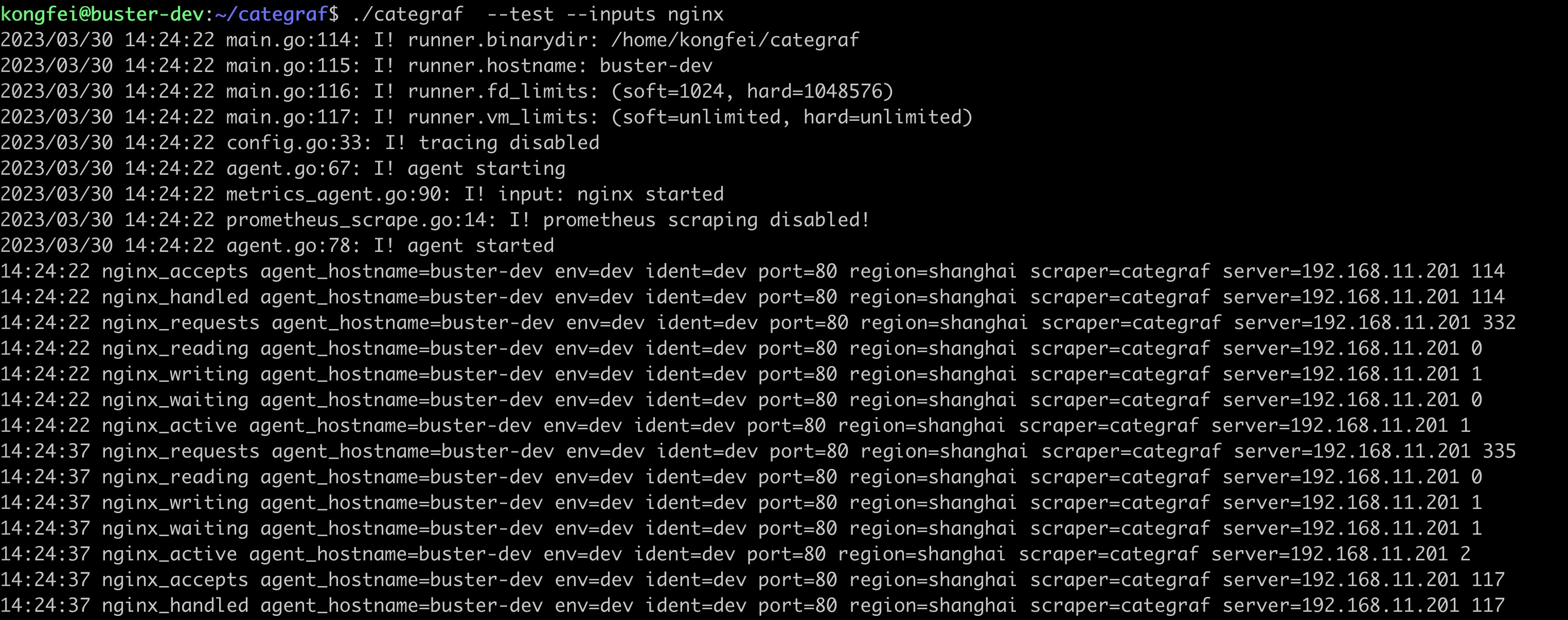
input.nginx 采集到的指标主要用于回答三个问题:
| 监控问题 | stub status 可提供的信息 | 使用边界 |
|---|---|---|
| 当前 Nginx 是否有连接压力 | 活跃连接、读、写、等待连接 | 只能看到整体连接状态,不能区分业务域名或 upstream |
| 请求量是否异常变化 | 累计 accepted、handled、requests | 需要结合采集间隔计算变化趋势 |
| 状态页是否可访问 | Categraf 采集成功与否 | 状态页建议限制访问来源,避免暴露给公网 |
指标包含请求连接、读写等基础运行状态。如果需要按 upstream、server_name 或状态码维度细分,stub_status 本身不够,需要换用更丰富的 Nginx 模块或日志分析方案。
大盘链接
根据指标整理的监控大盘见 https://github.com/flashcatcloud/categraf/blob/main/inputs/nginx/dashbaords.json
常见问题
Q1:为什么访问 /stub_status 返回 404 或空页面?
A:先用 nginx -V 确认编译参数中包含 --with-http_stub_status_module,再检查 location /stub_status 是否被正确加载,以及 nginx -t 是否通过。
Q2:生产环境可以直接暴露 /stub_status 吗?
A:不建议直接暴露到公网。状态页通常只需要被采集器访问,建议通过网络 ACL、Nginx 访问控制或内网地址限制访问范围。
Q3:stub status 和 vts、upstream check 怎么选?
A:只需要基础连接和请求状态时,stub_status 足够简单;需要 upstream 健康状态时看 upstream check;需要更完整的 vhost、upstream、状态码等指标时再考虑 vts。
小结
Nginx stub_status 的价值在于简单、稳定、接入成本低。本文流程的关键点只有三个:编译时启用模块,配置可访问的状态页,再让 Categraf input.nginx 指向该 URL。完成后即可获得 Nginx 基础连接与请求指标,为后续告警和大盘建设提供数据来源。
关于作者
本文作者孔飞,快猫星云工程师,文章内容是快猫技术团队共同沉淀的结晶。我们会持续输出监控、稳定性保障相关的技术文章,文章可转载,转载请注明出处,尊重技术人员的成果。