
夜鶯(Nightingale)通知媒介功能介紹
通知媒介
通知媒介主要功能有兩個
- 控制哪些通知媒介在告警規則中展示,可以關閉不會用到的聯繫方式,讓通知媒介配置更簡潔
- 用戶可以自己創建新的通知媒介,適配公司自己的通知通道,在自定義通知腳本中根據是否配置了新增的通知媒介來進行相應的通知發送
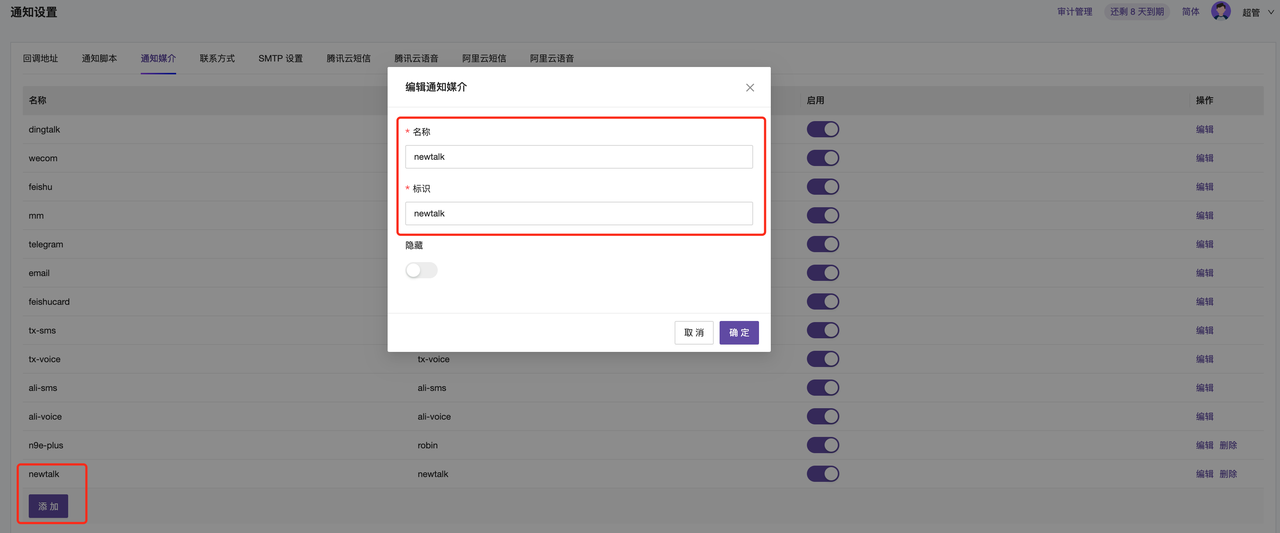
配置說明
名稱:前台顯示名稱
標識:調用唯一標識
隱藏:是否在告警規則的通知配置中展示
啟用:該通知媒介是否啟用
注意:如果未啟用,則在告警規則配置裡默認不顯示。
使用場景
用戶自己創建的通知媒介和聯繫方式主要在自定義通知腳本中使用,下面是一個腳本調用舉例,可以參考樣例腳本,對接自己的內部通信工具。
系統會把告警事件的內容 encode 成 json,然後通過 stdin 的方式傳給通知腳本,腳本示例如下:
#!/usr/bin/env python
# -*- coding: UTF-8 -*-
import sys
import json
import urllib2

reload(sys)
sys.setdefaultencoding('utf8')  # 設置默認編碼為utf-8

class Sender(object):
    @classmethod
    # 方法send_newtalk,newtalk要和配置的通知媒介一致;
    def send_newtalk(cls, payload):
        try:
            #print("Starting send_newtalk".encode('utf-8'))
            # 從payload中獲取事件數據
            event = payload.get('event')
            # 獲取通知用戶對象
            users = event.get("notify_users_obj")
            # 獲取告警規則名稱
            rule_name = event.get("rule_name")
            # 默認事件狀態為 觸發
            event_state = "Triggered"
            # 如果事件已恢復,則狀態為"恢復"
            if event.get("is_recovered"):
                event_state = "Recovered"
            # 用於存儲Dingtalk機器人令牌和用戶電話
            tokens = {}
            phones = {}

            #print("Extracting user information".encode('utf-8'))
            # 遍歷用戶,收集電話和Dingtalk令牌
            for u in users:
                if u.get("phone"):
                    phones[u.get("phone")] = 1

                contacts = u.get("contacts")
                # dingtalk_robot_token,需要根據需求替換對應名稱,在夜鶯通知設置-聯繫方式設定名稱,用戶裡面配置參數
                if contacts.get("dingtalk_robot_token", ""):
                    tokens[contacts.get("dingtalk_robot_token", "")] = 1
            # 設置請求頭
            headers = {
                "Content-Type": "application/json;charset=utf-8"
            }

            #print("Tokens: {}".format(tokens).encode('utf-8'))
            #print("Phones: {}".format(phones).encode('utf-8'))
            # 遍歷令牌,構建請求並發送到Dingtalk
            for t in tokens:
                url = "https://oapi.dingtalk.com/robot/send?access_token={}".format(t)
                body = {
                    "msgtype": "markdown",
                    "markdown": {
                        "title": "{} - {}".format(event_state, rule_name),
                        "text": "{} {}".format(payload.get('tpls').get("dingtalk.tpl", "dingtalk.tpl not found"), ' '.join(["@"+i for i in phones.keys()]))
                    },
                    "at": {
                        "atMobiles": list(phones.keys()),
                        "isAtAll": False
                    }
                }

                #print("Sending request to URL: {}".format(url).encode('utf-8'))
                #print("Request body: {}".format(body).encode('utf-8'))

                data = json.dumps(body)
                req = urllib2.Request(url, data=data, headers=headers)
                req.get_method = lambda: "POST"
                response = urllib2.urlopen(req)
                result = response.read()
                #print("Response status code: {}".format(response.getcode()).encode('utf-8'))
                #print("Response text: {}".format(result).encode('utf-8'))
        # 捕獲所有異常,防止程序崩潰
        except Exception as e:
            #print("Error in send_newtalk: {}".format(e).encode('utf-8'))

def main():
    try:
        #print("Reading payload from stdin".encode('utf-8'))
        payload = json.load(sys.stdin)
        with open(".payload", 'w') as f:
            f.write(json.dumps(payload, indent=4))
        #print("Payload written to .payload file".encode('utf-8'))

        for ch in payload.get('event').get('notify_channels'):
            send_func_name = "send_{}".format(ch.strip())
            #print("Processing channel: {}, function name: {}".format(ch, send_func_name).encode('utf-8'))
            if not hasattr(Sender, send_func_name):
                #print("Function {} not found".format(send_func_name).encode('utf-8'))
                continue
            send_func = getattr(Sender, send_func_name)
            send_func(payload)

    except Exception as e:
        print("Error in main: {}".format(e).encode('utf-8'))

def hello():
    print("hello nightingale".encode('utf-8'))

if __name__ == "__main__":
    if len(sys.argv) == 1:
        main()
    elif sys.argv[1] == "hello":
        hello()
    else:
        print("I am confused".encode('utf-8'))
示例腳本中有很多 print 打印的輸出,主要是為了方便調試使用。如果開啟,可通過 n9e 的日誌進行查看,日誌調試在 INFO.log,報錯狀態在 ERROR.log,過濾關鍵詞 event_script_notify。







